
AI Managed Investing on Robinhood: A Complete Guide
Investing, AI managed investing on Robinhood, Automated Portfolios
The Complete Guide to AI Managed Investing on Robinhood
AI is no longer just for hedge funds and quant shops. With Robinhood’s new Agentic Accounts and secure integrations, everyday investors can now manage your own investments with AI—while still staying in control of every trade. This guide walks you through how AI managed investing on Robinhood works with Claude, what the Robinhood agentic account actually is, how the MCP Protocol keeps your money and data safe, and exactly who this setup is right for (and who should avoid it).

What Is AI Managed Investing on Robinhood?
When people talk about AI managed investing on Robinhood, they usually mean using a large language model like Claude as an AI portfolio manager for beginners that can research markets, suggest trades, rebalance your portfolio, and monitor risk—without you needing to stare at charts all day. The key difference from traditional robo-advisors is control: instead of handing everything to a black box, you can let Claude do the heavy lifting while you approve or decline each move.
Robinhood’s new Agentic Trading experience, built around the Robinhood agentic account, is designed specifically for this kind of AI-assisted investing. It gives AI agents tools to view your dedicated account, propose trades, and even execute them—within strict boundaries you define. According to Robinhood’s own documentation, the Agentic Account is a separate, self-directed account that isolates the funds your agent can touch from your main portfolio (Robinhood, “Setting up an agent,” 2026).
Understanding the Robinhood Agentic Account
The Robinhood agentic account is the foundation of AI managed investing on Robinhood. Think of it as a fenced-off sandbox where your AI agent can operate. You must already have a regular Robinhood brokerage account in good standing; then, from within the mobile app, you can create a dedicated Agentic Account under the “Agents” tab (Robinhood Support, 2026).
You give your agent a name (which also becomes the nickname of the Agentic Account).
You choose between a cash or limited-margin structure, depending on your risk tolerance and eligibility.
You decide whether trades require approval by default (recommended for most people) or whether the agent can execute automatically.
Crucially, the Agentic Account is segregated from your main Robinhood holdings. Only the cash and assets you explicitly move into this account are exposed to AI-driven activity. That means even if your AI agent makes a series of bad calls, the damage is limited to the amount you dedicated to that sandbox. Robinhood highlights this isolation as a core safety feature in its Agentic documentation and investor materials.
What Can an Agent Do Inside the Agentic Account?
Once you’ve set up an Agentic Account, an AI agent like Claude can access a rich set of tools (as permitted by Robinhood) to act as your AI portfolio manager for beginners:
View balances, positions, and recent trades within the Agentic Account only.
Access market data, watchlists, scanners, and alerts provided by Robinhood’s tooling layer.
Propose or place orders in supported asset classes—currently equities, options, and crypto, with futures and prediction markets on the roadmap (Robinhood Newsroom, 2026).
State-level rules still apply. For example, agentic crypto trading is not available in certain states, and some (like California and Connecticut) require approvals for crypto trades even if you’ve otherwise allowed automation. Robinhood’s support pages spell out these jurisdiction-specific restrictions in detail.
How MCP Protocol Keeps Claude–Robinhood Connections Safe
To connect Claude to Robinhood in a secure, controlled way, Robinhood and modern AI tools rely on the MCP Protocol (Model Context Protocol). MCP is an emerging standard for letting AI models call external tools—like broker APIs or credit cards—without ever directly holding your credentials or unfettered access to your accounts.
Core Ideas Behind MCP Protocol Security
While implementation details can evolve, the security principles MCP enforces are consistent and intuitive:
Tool-based access, not raw credentials. Claude never sees your Robinhood password, bank details, or full account numbers. It only interacts through narrow, predefined tools—like “place_order” or “get_positions”—that Robinhood exposes via MCP-compatible connectors.
Scoped permissions. The tools exposed through MCP are scoped to your Robinhood agentic account, not your entire financial life. That means an AI can’t suddenly decide to drain your main brokerage or external bank account; it’s confined to the sandbox you set up and funded.
Human-in-the-loop safety. MCP is designed to work well with workflows where the AI proposes actions and a human explicitly approves them—exactly the safety model Robinhood encourages for most users. More on this approval model below.
In practice, this means AI managed investing on Robinhood can feel seamless—Claude can see your positions, analyze risk, and draft trades—while the underlying MCP Protocol quietly ensures that all access is logged, constrained, and revocable. If at any point you disconnect the agent or revoke permissions, the MCP tool calls simply stop working.
The Safety Model: Claude Proposes, You Approve
The most important design choice in this system is the approval-based safety model. For most investors—especially those using an AI portfolio manager for beginners—the default and recommended mode is: Claude proposes, and you approve.
How the Proposal–Approval Flow Works
Claude reviews your Agentic Account via MCP tools—positions, cash, performance, and risk exposure—and possibly recent market conditions.
Based on your stated goals and constraints, Claude generates a clear, human-readable plan: for example, “Sell 10 shares of XYZ to reduce concentration and buy a diversified ETF instead.”
Robinhood surfaces this plan to you in the app—often as a notification or in your agent chat—showing the exact orders, quantities, and estimated costs or proceeds.
You approve, edit, or decline. Only if you approve does Claude actually call the “place_order” tool via MCP, and Robinhood executes the trades in your Agentic Account.
This keeps you firmly in the driver’s seat. Claude can still do the time-consuming work—screening stocks, checking correlations, monitoring volatility—but you retain veto power over every order. You can also switch to more automated modes later if you gain confidence, though Robinhood itself emphasizes that users remain responsible for outcomes, even when using agents (Robinhood Investor Relations, 2026).

📌 Key Takeaway: With Robinhood’s approval model and MCP tooling, you can manage your own investments with AI without surrendering control. Claude suggests; you decide.
How to Connect Claude to Robinhood: Step-by-Step Overview
Exact screens and wording may change over time, but the high-level process to connect Claude to Robinhood for AI managed investing follows a consistent pattern. You’re essentially linking three layers:
Your Robinhood Agentic Account (the sandbox where trades happen).
Claude (your AI agent that analyzes and proposes trades).
MCP Protocol tools (the secure bridge between the two).
1. Create and Fund Your Robinhood Agentic Account
In the Robinhood mobile app, open the Agents tab. Start the onboarding flow to set up an Agentic Account (Robinhood Support, 2026).
Choose your account type (cash or limited-margin) and agree to the disclosures. This is still a self-directed brokerage account, just with additional agent tooling layered on top.
Fund the Agentic Account via bank transfer, internal transfer from your main Robinhood account, or asset transfer. You can start small—many users treat this as an experimental sandbox before scaling up.
2. Select Claude as Your Model and Define Permissions
During agent setup, Robinhood prompts you to choose an LLM model. Options may include Claude and others, each with different strengths and costs (Robinhood Support, 2026). Select Claude if you want its reasoning style and safety-focused design.
Decide whether trade approvals are required. For a beginner-friendly AI portfolio manager, keep approvals enabled so Claude proposes and you approve. You can revisit this later if you become more comfortable with automation.
3. Authorize MCP Tools Between Claude and Robinhood
From the Robinhood side, you’ll confirm that your chosen agent (Claude) can use a specific set of tools: viewing positions, fetching market data, simulating trades, and—if you allow—submitting orders in your Agentic Account. This is where MCP Protocol comes in: it defines exactly what Claude can and cannot do on your behalf.
From the Claude side (for example, in an AI agent hub that supports MCP), you’ll connect your Robinhood account by following a secure OAuth-style flow. You’ll log into Robinhood directly and grant limited access to the agent—not by pasting passwords into a chat window, but through Robinhood’s own authentication screens.
4. Define Your Investing Rules and Goals for Claude
Once you connect Claude to Robinhood, your first conversation should be about constraints. Tell Claude your risk tolerance, time horizon, diversification preferences, and what assets you want to avoid (for example, “no leveraged ETFs” or “no single stock positions above 10% of portfolio”).
Ask Claude to restate your rules back to you in its own words. This helps catch misunderstandings and gives you a written “policy” you can refer back to later when evaluating its suggestions.
5. Start with Small, Supervised Trades
Have Claude analyze your current Agentic portfolio and propose a small adjustment—perhaps rebalancing from an over-weighted stock into a broad ETF, or deploying a small fraction of idle cash into a diversified basket.
Review the proposal carefully. Ask follow-up questions in natural language: “What risks does this introduce?” or “How would this have performed in the last major downturn?” Only approve when you’re comfortable.
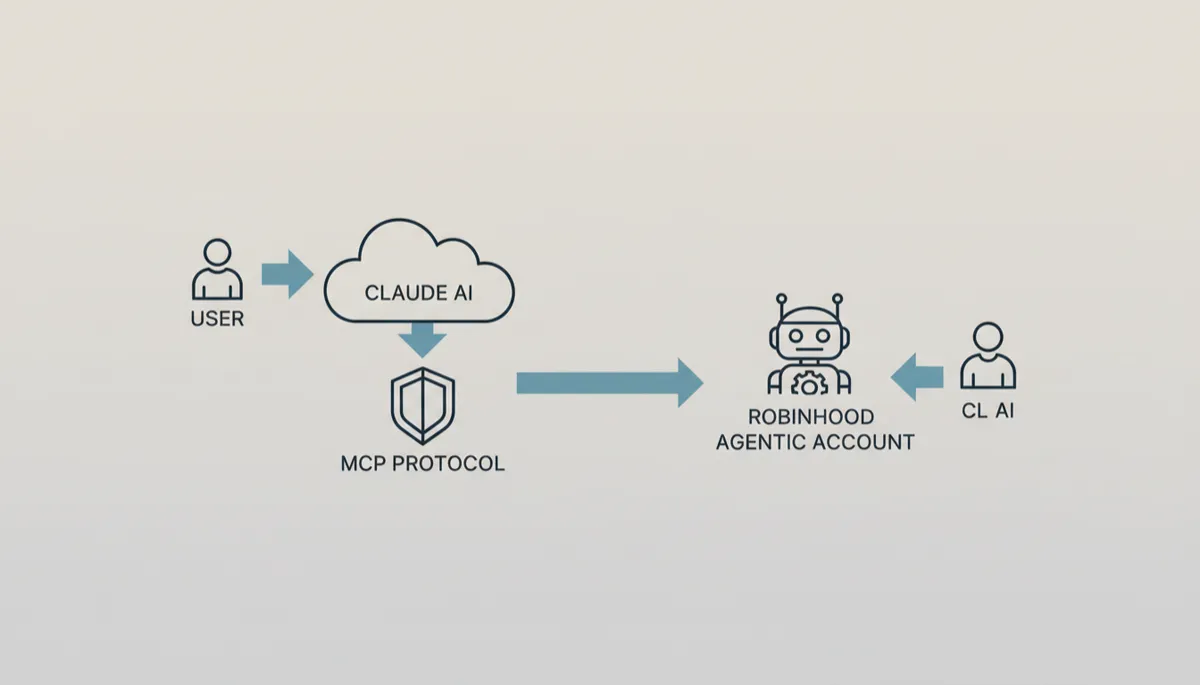
Clear roles and boundaries let AI assist while your approval remains central.
Roles in the System: Claude, Robinhood, You, the Scheduler, and Email Summaries
To understand how to manage your own investments with AI, it helps to see the entire system as a set of cooperating roles, each with a narrow responsibility. This separation is part of what makes AI managed investing on Robinhood safer and more transparent.
Claude: Your AI Portfolio Assistant
Claude acts as your research analyst, risk officer, and portfolio strategist rolled into one. Using MCP tools, it can:
Review your Agentic Account positions and cash balance on a schedule or on demand.
Generate proposals for rebalancing, diversification, risk reduction, or deploying new capital based on your rules and goals.
Explain its reasoning in plain English, so you can learn as you go rather than blindly following recommendations.
Robinhood: Brokerage, Execution, and Guardrails
Robinhood provides the regulated brokerage infrastructure behind the scenes: account opening, custody of assets, order routing, and compliance. For Agentic Accounts specifically, Robinhood also:
Enforces the boundaries of the Agentic Account so your main account remains untouched by agent activity (Robinhood Support, 2026).
Applies regulatory rules and state-level restrictions for assets like options and crypto, even when trades are initiated by an agent.
Surfaces notifications and logs of agent actions so you can monitor what’s happening in real time and pause or disconnect agents if needed.
You: The Decision-Maker and Risk Owner
Even with an advanced AI assistant, you remain the portfolio owner and ultimate decision-maker. Your responsibilities include:
Setting clear goals, constraints, and risk limits for Claude to follow.
Reviewing proposals, asking questions, and approving or declining suggested trades—especially in the early stages of using the system.
Monitoring your overall financial picture beyond the Agentic Account (retirement accounts, emergency funds, debt) and ensuring your AI-driven sandbox fits into a sensible plan.
The Scheduler: Automating Regular Check-Ins
Many AI investing setups layer on a scheduler—a simple automation that triggers Claude to review your Agentic Account on a recurring basis, such as daily or weekly. The scheduler itself doesn’t make decisions; it just ensures that:
Your portfolio gets regular attention even when you’re busy with work or life.
Rebalancing and risk checks happen consistently, not only when you remember to log in.
Email Summaries: Staying Informed Without Staying Glued to Screens
The final piece in many workflows is an email summary system. After Claude runs its scheduled review and (if appropriate) drafts proposals, a brief summary can be emailed to you. A typical summary might include:
Current portfolio value and major changes since the last report.
Any risk flags Claude noticed—such as concentration in a single stock or sector.
A concise list of proposed trades with links or prompts to approve them in the Robinhood app.
💡 Pro Tip: Treat these summaries as your personal investment briefings. Even if you don’t act on every suggestion, they keep you engaged and learning—without requiring you to be a full-time trader.
Who Is AI Managed Investing on Robinhood Best For?
AI tools can be powerful, but they’re not magic—and they’re not right for everyone. Before you dive into setting up a Robinhood agentic account and connecting Claude, it’s worth asking whether this approach fits your personality, goals, and financial situation.
Ideal Users: Curious, Hands-On, and Long-Term Oriented
Beginner investors who want guidance, not hand-holding. If you’re new to markets and want an AI portfolio manager for beginners that can explain concepts, suggest diversified allocations, and help you avoid obvious mistakes—while you still approve each move—this setup can be a great fit.
Busy professionals. If you have the income to invest but not the time to research, letting Claude monitor your Agentic Account and send concise email summaries can keep your portfolio from drifting off course while you focus on your career or family.
Tech-savvy DIY investors. If you enjoy tinkering with strategies, comparing ETFs, or experimenting with small option positions, AI managed investing on Robinhood gives you a sandbox to explore ideas with an AI co-pilot—without risking your entire nest egg.
Who Should Probably Avoid This Setup (At Least for Now)
Anyone without an emergency fund or with high-interest debt. If you’re still building basic financial stability, your priority should be cash buffers and paying down expensive debt, not experimenting with AI trading tools—no matter how advanced they sound.
People who want guaranteed returns. AI does not eliminate market risk. Robinhood is clear that trading with agents is still self-directed investing, with all the usual volatility, drawdowns, and uncertainty. If you’re looking for guarantees, this is not the right path.
Users uncomfortable with technology. While Robinhood is working to make Agentic onboarding smoother, you still need to be comfortable navigating apps, reading disclosures, and understanding what permissions you’re granting. If that feels overwhelming, a simpler robo-advisor or human advisor might be better.
Common Questions About Safety, Costs, and Requirements
Is AI Managed Investing on Robinhood Safe?
“Safe” has two dimensions here: technical safety (can someone steal my money or data?) and investment risk (can I lose money?). On the technical side, the combination of the Robinhood agentic account and MCP Protocol is designed to limit blast radius and enforce clear boundaries. The agent only operates in the sandbox you fund, with tools you explicitly approve, and you can pause or disconnect it at any time (Robinhood Newsroom, 2026).
On the investment side, there is no way to eliminate market risk. AI can help you diversify, rebalance, and avoid emotional mistakes, but it can’t see the future. Treat Claude as a powerful assistant, not an oracle. Start with small amounts in your Agentic Account and scale only if you’re comfortable with how the system behaves through different market conditions.
What Does It Cost to Use Claude with a Robinhood Agentic Account?
Robinhood’s core trading model is still built around low or zero commissions, but there may be additional costs associated with using advanced agents and LLMs. These can include:
Model usage fees. During agent setup, Robinhood notes that different models (including Claude) can have different pricing, speed, and reasoning capabilities. Some may be subsidized; others may pass through per-usage costs. Always check the latest pricing in the app before enabling an agent.
Premium features. Some advanced tooling, like certain data feeds or options analytics, may require Robinhood Gold or similar premium tiers. Again, check current terms in the Robinhood Help Center.
On the AI side, Anthropic’s Claude is typically accessed through platforms or subscriptions that bundle usage costs. If you’re using a third-party agent hub that integrates with Robinhood via MCP, that hub may have its own pricing model as well. Factor all of this into your decision—and remember that low fees don’t guarantee good outcomes, but high fees are a guaranteed drag on returns.
What Are the Requirements to Get Started?
An individual Robinhood brokerage account in good standing (required before you can open an Agentic Account, per Robinhood Support, 2026).
Access to the Robinhood mobile app, since the full Agentic Trading experience is currently mobile-first, with limited web functionality (Robinhood Support, 2026).
Eligibility for the assets you want to trade (for example, options approval, crypto availability in your state).
Access to Claude via a platform that supports MCP Protocol and integrates with Robinhood’s Agentic tools.
Can I Turn the Agent Off If I Change My Mind?
Yes. Robinhood’s Agentic system is built with reversibility in mind. You can pause or disconnect agents from within the app, revoke their MCP permissions, or even transfer assets out of the Agentic Account entirely. If you ever feel uncertain, you can simply stop approving proposals and unwind positions manually over time.
Putting It All Together: Manage Your Own Investments with AI—Thoughtfully
The combination of Claude, the Robinhood agentic account, and MCP Protocol gives individual investors access to tools that, until recently, were reserved for institutions with deep engineering teams. You can now manage your own investments with AI in a way that:
Keeps your main portfolio insulated via a dedicated Agentic sandbox.
Lets Claude handle research, monitoring, and proposal drafting while you stay in control of approvals.
Uses secure, scoped MCP tools instead of sharing raw credentials with an AI agent.
As with any powerful tool, the value you get from AI managed investing on Robinhood depends on how you use it. Start small. Be explicit about your goals and limits. Ask Claude to explain its reasoning, not just give you answers. And remember that no AI, no matter how advanced, can remove the fundamental uncertainty of markets.
Used thoughtfully, though, an AI assistant like Claude can turn your Robinhood Agentic Account into more than just a trading sandbox. It can become a learning environment—a place where you gradually build investing skill and confidence, supported by clear explanations, regular summaries, and a safety model that keeps you firmly in charge of every decision.